
What Is Cigati OST Converter? A Reliable Tool for Outlook Data Recovery
When your Microsoft Outlook mailbox becomes inaccessible due to a corrupted or offline OST file, retrieving your emails, contacts, and calendar entries can feel like a daunting task. That’s where Cigati OST Converter steps in as a powerful, free solution designed specifically for Windows users. This lightweight yet robust software specializes in converting OST (Offline Storage Table) files into PST (Personal Storage Table) files—formats that are fully compatible with Microsoft Outlook. Whether you're migrating from an old Exchange server, recovering lost data after a system crash, or simply backing up your Outlook profile, this tool delivers fast and secure results.
Developed by Cigati Solutions, the software has gained popularity since its release on Softonic in June 2024. With over 100,000 downloads and a solid 4.1 rating, it's clear that users appreciate its simplicity and effectiveness. The current version, 20.0, is optimized for Windows 11 and above, ensuring compatibility with modern systems while maintaining performance on older versions like Windows 10 and 8.1. One of its standout features is the intuitive interface—designed with both beginners and advanced users in mind—making the conversion process straightforward, even for those unfamiliar with file formats.
What makes Cigati OST Converter truly valuable is its ability to recover data without altering the original OST file. This non-destructive approach ensures that your source data remains intact, reducing the risk of permanent loss. It also preserves folder structure, email metadata, and attachments, so nothing important gets left behind.
For businesses and individuals alike, this tool offers peace of mind when dealing with critical email archives. Best of all, it’s completely free to download and use, with no hidden fees or trial limitations. If you're looking for a dependable way to convert OST to PST, this is one of the top free tools available today.
Key Features of Cigati OST Converter – Why It Stands Out
Cigati OST Converter isn’t just another file conversion tool—it’s a comprehensive solution built with real user needs in mind. Its feature set is both powerful and accessible, making it a go-to choice for anyone dealing with Outlook data recovery or migration. One of the most important features is its 100% data integrity guarantee. During the conversion process, the software meticulously preserves the original structure of your emails, contacts, calendars, tasks, and notes. This means your folders stay organized, and no attachments are lost—critical for professionals who rely on accurate record-keeping.
Another standout feature is its batch conversion capability. If you’re managing multiple OST files—common in enterprise environments—you can process them all at once, saving hours of manual work. The tool also supports selective conversion, allowing you to choose specific folders or date ranges to export, which is ideal for minimizing file size and focusing on relevant data. For users concerned about security, Cigati OST Converter includes password protection support, enabling the conversion of encrypted OST files without compromising safety.
The software also provides real-time progress tracking and a detailed log report after each conversion. This transparency helps users verify that the process completed successfully and identify any potential issues early. Additionally, the output PST files are fully compatible with all versions of Microsoft Outlook, including Outlook 2021, 2019, 2016, and earlier.
You can open the converted PST file directly in Outlook, or even import it into other email clients that support the PST format. With its clean, minimalistic interface and straightforward workflow, Cigati OST Converter ensures a hassle-free experience from start to finish. Whether you're recovering from a server failure or preparing for a migration, these features make it one of the most reliable free OST-to-PST tools on the market.
How to Use Cigati OST Converter: Simple Steps for Seamless Conversion
Using Cigati OST Converter is designed to be as simple as possible, even for users with minimal technical knowledge. The installation process is quick and straightforward. Begin by downloading the latest version (20.0) from the official Softonic page.
Once downloaded, run the installer and follow the on-screen prompts. The setup takes less than a minute and doesn’t require any complex configurations. After installation, launch the application—it opens with a clean, no-nonsense interface that guides you through each step.
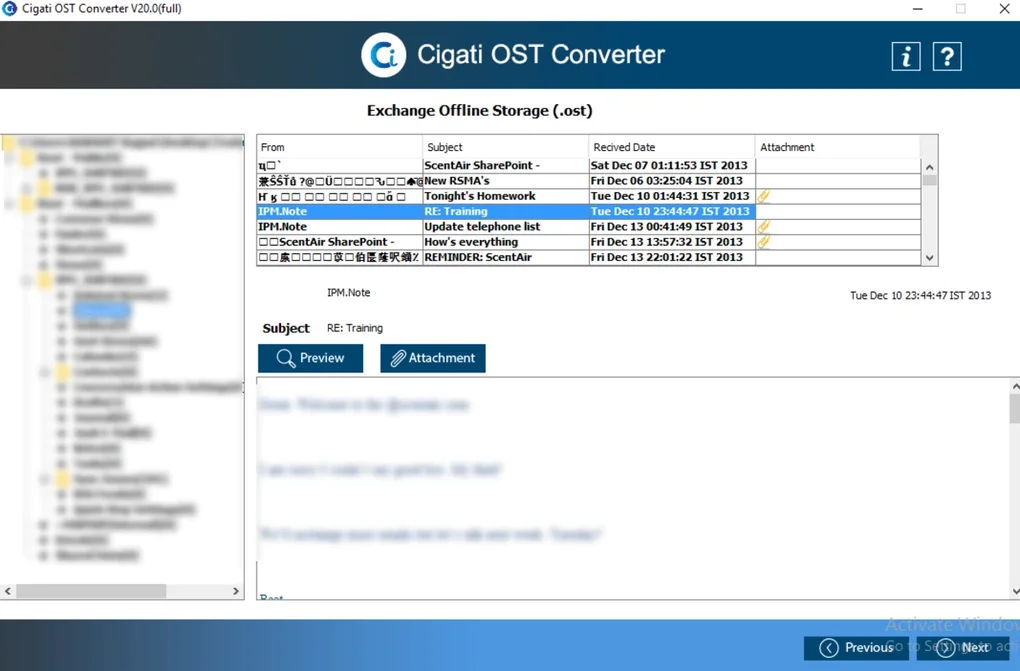
Step 1: Click on “Add OST File” and browse to the location of your OST file. This file is typically stored in your local profile directory, such as C:\Users\YourName\AppData\Local\Microsoft\Outlook. Select the file and wait for the software to scan it. The scanning process is fast and provides a preview of the data structure, including folders and email counts.
Step 2: Choose your conversion options. You can opt for a full conversion or select specific folders and date ranges. If your OST file is password-protected, enter the password at this stage. The tool will then begin the conversion process, which runs in the background with real-time progress updates.
Step 3: Once complete, click “Save” to choose a location for your new PST file. You can also rename the output file for easier identification. The final PST file is ready to be imported into Microsoft Outlook. Simply open Outlook, go to File > Open & Export > Import/Export, and select “Import from another program or file,” then choose the PST file.
For advanced users, the tool also supports command-line operations for automation, which is useful in IT environments managing multiple user profiles. Overall, the entire process—from download to successful conversion—can be completed in under 10 minutes, making it an efficient solution for urgent data recovery or migration tasks.
Pros and Cons: Is Cigati OST Converter Right for You?
- Pros:
- Free to download and use with no hidden costs
- Supports conversion of password-protected OST files
- Preserves folder hierarchy, attachments, and metadata
- Fast and efficient batch processing for multiple files
- Compatible with all versions of Microsoft Outlook
- Simple, intuitive interface suitable for beginners
- Non-destructive conversion—original OST remains unchanged
- Cons:
- Only available for Windows (no Mac, Android, or iOS versions)
- Limited to OST-to-PST conversion (no other formats supported)
- No built-in backup or restore feature
- Only available in English
- May struggle with extremely large OST files (>100 GB) due to memory constraints
Frequently Asked Questions (FAQ) About Cigati OST Converter
Final Verdict: A Must-Have Tool for Outlook Users
After thorough evaluation, Cigati OST Converter stands out as one of the most reliable, free tools for converting OST files to PST on Windows. Its combination of ease of use, data integrity, and fast performance makes it ideal for both personal and professional use. Whether you're recovering lost emails after a system crash, migrating to a new email server, or simply backing up your Outlook data, this software delivers results without complications.
While it has limitations—such as being Windows-only and lacking support for other file formats—it excels in its core purpose. For users who need a secure, free, and efficient way to access their Outlook data, Cigati OST Converter is an excellent choice. With over 100,000 downloads and a strong 4.1 rating, it’s trusted by a growing community of users.
Download Cigati OST Converter today and take control of your Outlook data with confidence. It’s free, secure, and designed to work seamlessly with your existing Microsoft Outlook setup. Don’t wait until your email data becomes inaccessible—get this essential tool now.







